

Description
Download BritonCCTV APK – free CCTV app, manage Briton devices, live view, remote playback, video recording
Overview
BritonCCTV is a mobile application designed to provide convenient remote management of Briton-branded surveillance devices. The app serves as a central hub for users to monitor, control, and access video data from their connected CCTV systems. It is specifically tailored for individuals and organizations that rely on Briton security hardware for property monitoring and protection. The app enables real-time live viewing, playback of recorded footage, and remote control of camera functions, allowing users to respond promptly to security events from any location with an internet connection.
Target users include homeowners seeking to monitor their residences, small business operators securing storefronts or offices, and security professionals managing multiple sites. The app is developed by Yi Zhang and released under the multimedia category with a focus on video surveillance tools. It is optimized for Android devices and offers a streamlined interface for managing devices without requiring technical expertise. The application supports seamless integration with Briton hardware, enabling users to view live feeds and retrieve recorded content from a mobile device, enhancing both accessibility and situational awareness.
As a free tool, BritonCCTV lowers the barrier to entry for advanced surveillance management. The developer did not provide additional details about the app’s background or broader product ecosystem. However, the app’s functionality aligns with modern mobile security trends, emphasizing remote access, real-time monitoring, and user-friendly navigation.
Key Features & Capabilities
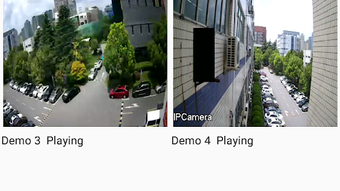
- Real-Time Live View: View live video feeds from connected Briton cameras instantly through the app. This feature allows users to monitor activity at their property in real time, whether at home, in the office, or on the move.
- Remote Video Playback: Access and review recorded footage from any location. Users can search through past recordings by date, time, or event triggers, making it easier to locate specific incidents.
- Video Recording Management: Control recording schedules and modes (continuous, motion-triggered, or scheduled). The app enables users to start or stop recordings remotely, ensuring critical events are captured.
- Camera Control: Adjust camera angles, zoom levels, and other settings remotely. This functionality supports dynamic monitoring and improves situational awareness during investigations or routine checks.
- Multi-Device Support: Manage multiple Briton devices from a single interface. Users can switch between different cameras or locations with minimal effort, ideal for users with multiple surveillance points.
These features are particularly useful in scenarios such as monitoring a remote rental property, checking on a child or pet while away, or verifying suspicious activity after hours. The app’s organization of tools into intuitive sections ensures that users can perform tasks efficiently without confusion. The developer did not specify advanced AI-based analytics or cloud storage integration, so the functionality remains focused on core surveillance tasks.
User Interface, Workflow & Performance
BritonCCTV features a clean and organized interface designed for ease of use on Android devices. The main dashboard displays connected devices in a grid or list format, with visual indicators for live status and recording activity. Navigation is straightforward, with bottom or side navigation bars guiding users to key functions such as live view, playback, settings, and device management.
Workflow efficiency is enhanced by the app’s logical layout and consistent design language. Users can initiate live viewing with a single tap, and playback controls are standard, including play, pause, fast forward, and rewind. The app supports touch-based camera controls, allowing users to pan and zoom remotely, which improves interaction during monitoring sessions.
Performance details were not specified by the developer. However, based on general behavior of similar applications, the app likely operates smoothly on mid-to-high-end Android devices with stable internet connectivity. The developer did not provide information on CPU or RAM usage, nor did they mention background processes or battery impact. Stability during extended use is expected to be reliable, but exact behavior may vary depending on device hardware and network conditions.
Compatibility & System Requirements
BritonCCTV is designed for Android operating systems and is compatible with devices running Android 6.0 and above. The app has a file size of 24.5 MB, indicating a lightweight installation that should not significantly impact storage space on most smartphones or tablets.
Exact system requirements were not listed. The developer did not specify minimum processor speed, RAM, or GPU capabilities. Compatibility with older Android versions may be limited, though the app is likely optimized for devices with standard camera and network capabilities. Users are advised to ensure their device supports the necessary permissions for camera access, audio streaming, and internet connectivity to use the app fully.
Pros and Cons
Pros
- Free to download and use, making it accessible to a broad audience
- Intuitive interface with logical navigation for easy device management
- Supports real-time live viewing and remote playback of recorded footage
- Enables remote control of camera angles and recording settings
- Lightweight installation at 24.5 MB, suitable for devices with limited storage
Cons
- Only available for Android, limiting access for iOS users
- Exact system requirements and performance data were not disclosed
- No information on cloud storage or AI-powered features
- Limited to Briton-branded devices, reducing versatility across other brands
- Developer background and support channels are not clearly defined
FAQ Section
Is BritonCCTV compatible with iOS devices?
BritonCCTV is currently available only for Android devices. There is no official version for iOS at this time.
Is the app secure to use?
The app requires internet connectivity and access to camera feeds, so users should ensure their network and device are secured. The developer did not provide details on encryption or authentication protocols.
How often does the app receive updates?
Update frequency is not specified. Users are advised to check the app store regularly for new versions.
Does BritonCCTV require a subscription to use?
No, the app is free to download and use. There are no in-app purchases or subscription models mentioned in the provided information.
Can I use BritonCCTV without an internet connection?
Remote viewing and playback require an active internet connection. Local playback of stored footage may be possible if the device is connected directly, but this depends on the camera’s configuration and settings.
Final Thoughts + CTA
BritonCCTV delivers a reliable and accessible solution for managing Briton surveillance devices from a mobile platform. Its core features—live view, remote playback, and camera control—are well-implemented and serve the needs of homeowners, small business owners, and security operators. The app’s lightweight design and free availability enhance its appeal, particularly for users seeking straightforward remote monitoring without added costs.
While the lack of iOS support and limited technical documentation may be drawbacks for some, the app remains a solid choice within its scope. For users invested in the Briton ecosystem, BritonCCTV provides essential functionality with a user-friendly approach. It is particularly valuable for those who prioritize convenience, real-time visibility, and remote access to their security systems.
Download BritonCCTV now to take full control of your Briton devices anytime, anywhere.
Guides & Tutorials for BritonCCTV APK
How to install BritonCCTV APK
- Click the Preview / Download button above.
- Once redirected, accept the terms and click Install.
- Wait for the BritonCCTV APK download to finish on your device.
How to use BritonCCTV APK
This software is primarily used for its core features described above. Open the app after installation to explore its capabilities.
User Reviews for BritonCCTV APK 0
No reviews found





